
CMYK to HEX: How to Convert CMYK Colors to HEX Codes (Best Guide)
CMYK to HEX
If you’ve ever designed a brochure for print and then needed the same colors for a website, you’ve probably encountered the challenge of converting CMYK to HEX. Since print and digital media use different color systems, converting colors accurately is essential for maintaining a consistent brand identity across websites, marketing materials, and digital graphics.
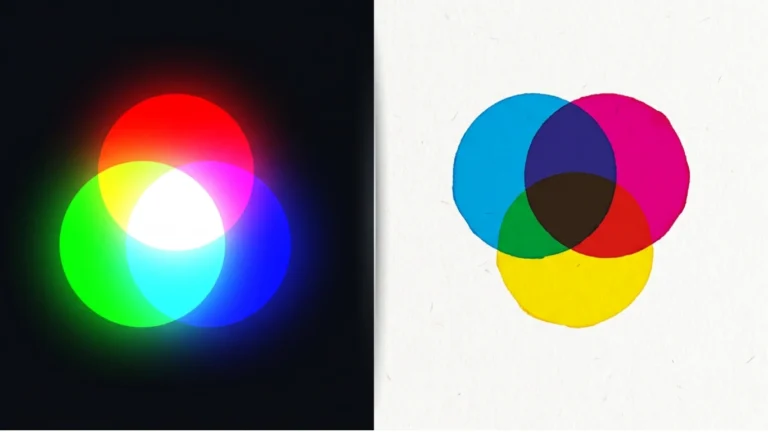
CMYK is the standard color model used for commercial print, while HEX is a color notation commonly used for HTML, CSS, and web designing. These systems are different technologies, there is no direct one-to-one conversion. Instead, CMYK colors are first converted to RGB, and then the RGB values are expressed as a six-digit hexadecimal (HEX) color code.
In this post, you’ll clear your concept what CMYK and HEX are, how the conversion works, when you should convert CMYK to HEX, common conversion mistakes, and practical examples to help you achieve accurate colors for both print and digital projects.
Quick Answer: CMYK to HEX
CMYK to HEX is the process of converting a print color defined by Cyan, Magenta, Yellow, and Black into a hexadecimal color code used by websites and digital applications.
Since HEX colors are based on the RGB color model, the conversion follows this path:
CMYK → RGB → HEX
Example:
- CMYK: 100, 0, 0, 0
- RGB: 0, 255, 255
- HEX: #00FFFF

CMYK to HEX at a Glance
| Feature | CMYK | HEX |
|---|---|---|
| Full Form | Cyan, Magenta, Yellow, Black | Hexadecimal Color Code |
| Primary Use | Printing | Web Design |
| Based On | Ink | RGB Values |
| Used In | Printers & Publishing | HTML, CSS, JavaScript |
| Example | 100, 0, 0, 0 | #00FFFF |
| Best For | Printed Materials | Digital Screens |
Table of Contents
- What Is CMYK?
- What Is HEX?
- Why Convert CMYK to HEX?
- How CMYK to HEX Conversion Works
- CMYK to HEX Examples
- CMYK vs HEX
- Common Conversion Mistakes
- Frequently Asked Questions
- Conclusion
What Is CMYK?
CMYK is a subtractive color model used for commercial and home printing. The name represents the four printing inks:
- C – Cyan
- M – Magenta
- Y – Yellow
- K – Black (Key)
Printers combine different percentages of these four inks to reproduce photographs, illustrations, packaging, books, magazines, and marketing materials. As more ink is added, more light is absorbed, producing darker colors.
CMYK is the standard color model used for printing because it reproduces colors with cyan, magenta, yellow, and black inks.

What Is a HEX Color Code?
A HEX color code is a six-digit hexadecimal representation of an RGB color. It tells browsers and design software exactly how much red, green, and blue should be displayed on a screen.
Every HEX code begins with the # symbol followed by six hexadecimal characters.
For example:
| Color | HEX Code |
|---|---|
| Black | #000000 |
| White | #FFFFFF |
| Red | #FF0000 |
| Green | #00FF00 |
| Blue | #0000FF |
| Cyan | #00FFFF |
HEX codes are widely used in HTML, CSS, JavaScript, graphic design software, and website builders because they provide a compact way to define RGB colors.
Why Convert CMYK to HEX?
Many designers work on projects that include both printed and digital materials. A business may print brochures in CMYK while using the same brand colors on its website. Converting CMYK to HEX helps maintain visual consistency across different platforms.
You may need to convert CMYK to HEX when:
- Creating a website from printed branding guidelines.
- Matching printed logos with website colors.
- Designing email newsletters.
- Building landing pages.
- Developing mobile applications.
- Creating online advertisements.
- Publishing social media graphics.
- Maintaining consistent brand identity.
Can CMYK Be Converted Directly to HEX?
No. There is no direct mathematical conversion from CMYK to HEX because the two systems are based on different color models.
The conversion is performed in two stages:
- Convert CMYK to RGB.
- Convert the resulting RGB values to a HEX code.
This is why professional design software and online converters use RGB as the intermediate step.
Who Uses CMYK to HEX Conversion?
- Web designers
- Graphic designers
- UI/UX designers
- Front-end developers
- Digital marketers
- Brand managers
- Print professionals
- Content creators
- Marketing agencies
How Does CMYK to HEX Conversion Work?
Converting CMYK to HEX is a two-step process because HEX color codes are based on the RGB color model rather than the CMYK printing model.
The conversion follows this workflow:
CMYK → RGB → HEX
First, the CMYK values are converted into RGB values. Those RGB values are then translated into a six-character hexadecimal code that browsers and design software can understand.
This approach allows the same color to be displayed on digital screens as closely as possible to its printed version.
Understanding the CMYK Color Model
CMYK uses percentages of four inks to create colors.
| Channel | Description |
|---|---|
| C | Cyan Ink |
| M | Magenta Ink |
| Y | Yellow Ink |
| K | Black (Key) Ink |
Each channel ranges from 0% to 100%.
For example:
- CMYK (0, 0, 0, 0) = White
- CMYK (0, 100, 100, 0) = Bright Red
- CMYK (100, 0, 100, 0) = Green
- CMYK (100, 100, 0, 0) = Blue
- CMYK (0, 0, 0, 100) = Black
Understanding HEX Color Codes
A HEX color code is another way of representing RGB values using hexadecimal numbers.
A standard HEX code contains six characters:
#RRGGBB
Each pair represents the intensity of one RGB channel.
| HEX Code | Color |
|---|---|
| #FFFFFF | White |
| #000000 | Black |
| #FF0000 | Red |
| #00FF00 | Green |
| #0000FF | Blue |
| #FFFF00 | Yellow |
CMYK to HEX Conversion Examples
| CMYK | Approximate RGB | HEX |
|---|---|---|
| 0, 0, 0, 0 | 255,255,255 | #FFFFFF |
| 0,0,0,100 | 0,0,0 | #000000 |
| 0,100,100,0 | 255,0,0 | #FF0000 |
| 100,0,100,0 | 0,255,0 | #00FF00 |
| 100,100,0,0 | 0,0,255 | #0000FF |
| 0,0,100,0 | 255,255,0 | #FFFF00 |
| 100,0,0,0 | 0,255,255 | #00FFFF |
Why Colors May Change During Conversion
Many users expect the converted HEX color to look exactly like the printed CMYK version. However, this is not always possible because RGB and CMYK have different color gamuts.
Digital screens can display many bright and saturated colors that cannot be reproduced accurately with printing inks. Likewise, certain printed colors may appear slightly different on various monitors due to display settings and color profiles.
For this reason, CMYK to HEX conversion provides the closest possible digital equivalent rather than a perfect match.
CMYK vs HEX
| Feature | CMYK | HEX |
|---|---|---|
| Primary Purpose | Printing | Digital Design |
| Based On | Ink | RGB Colors |
| Used In | Printers | Web Browsers |
| Format | Percentages | Hexadecimal Code |
| Example | 0,100,100,0 | #FF0000 |
| Best For | Print Projects | Websites & Apps |
Advantages of Using HEX Colors
- Supported by all modern web browsers.
- Perfect for HTML and CSS.
- Compact and easy to read.
- Ensures consistent colors across websites.
- Compatible with nearly every design application.
- Ideal for responsive web design.
- Widely used in UI and UX design.
Advantages of Using CMYK
- Industry standard for commercial printing.
- Produces predictable printed colors.
- Ideal for brochures, books, and packaging.
- Supports professional printing workflows.
- Optimized for ink-based output.
Where Is CMYK to HEX Conversion Commonly Used?
- Website redesign projects
- Brand identity updates
- Digital marketing campaigns
- Email newsletter templates
- Landing page development
- Company style guides
- E-commerce product pages
- Social media branding
- Mobile application interfaces
- Online advertising
If your brand colors were originally created for print, convert them carefully to HEX before using them on websites or mobile applications. Always compare the converted colors on multiple devices to ensure they closely match your brand identity.
How Does CMYK to HEX Conversion Work?
Converting CMYK to HEX is a two-step process because HEX color codes are based on the RGB color model rather than the CMYK printing model.
The conversion follows this workflow:
CMYK → RGB → HEX
First, the CMYK values are converted into RGB values. Those RGB values are then translated into a six-character hexadecimal code that browsers and design software can understand.
This approach allows the same color to be displayed on digital screens as closely as possible to its printed version.
Understanding the CMYK Color Model
CMYK uses percentages of four inks to create colors.
| Channel | Description |
|---|---|
| C | Cyan Ink |
| M | Magenta Ink |
| Y | Yellow Ink |
| K | Black (Key) Ink |
Each channel ranges from 0% to 100%.
For example:
- CMYK (0, 0, 0, 0) = White
- CMYK (0, 100, 100, 0) = Bright Red
- CMYK (100, 0, 100, 0) = Green
- CMYK (100, 100, 0, 0) = Blue
- CMYK (0, 0, 0, 100) = Black
Understanding HEX Color Codes
A HEX color code is another way of representing RGB values using hexadecimal numbers.
A standard HEX code contains six characters:
#RRGGBB
Each pair represents the intensity of one RGB channel.
| HEX Code | Color |
|---|---|
| #FFFFFF | White |
| #000000 | Black |
| #FF0000 | Red |
| #00FF00 | Green |
| #0000FF | Blue |
| #FFFF00 | Yellow |
CMYK to HEX Conversion Examples
| CMYK | Approximate RGB | HEX |
|---|---|---|
| 0, 0, 0, 0 | 255,255,255 | #FFFFFF |
| 0,0,0,100 | 0,0,0 | #000000 |
| 0,100,100,0 | 255,0,0 | #FF0000 |
| 100,0,100,0 | 0,255,0 | #00FF00 |
| 100,100,0,0 | 0,0,255 | #0000FF |
| 0,0,100,0 | 255,255,0 | #FFFF00 |
| 100,0,0,0 | 0,255,255 | #00FFFF |
Why Colors May Change During Conversion
Many users expect the converted HEX color to look exactly like the printed CMYK version. However, this is not always possible because RGB and CMYK have different color gamuts.
Digital screens can display many bright and saturated colors that cannot be reproduced accurately with printing inks. Likewise, certain printed colors may appear slightly different on various monitors due to display settings and color profiles.
For this reason, CMYK to HEX conversion provides the closest possible digital equivalent rather than a perfect match.
CMYK vs HEX
| Feature | CMYK | HEX |
|---|---|---|
| Primary Purpose | Printing | Digital Design |
| Based On | Ink | RGB Colors |
| Used In | Printers | Web Browsers |
| Format | Percentages | Hexadecimal Code |
| Example | 0,100,100,0 | #FF0000 |
| Best For | Print Projects | Websites & Apps |
Advantages of Using HEX Colors
- Supported by all modern web browsers.
- Perfect for HTML and CSS.
- Compact and easy to read.
- Ensures consistent colors across websites.
- Compatible with nearly every design application.
- Ideal for responsive web design.
- Widely used in UI and UX design.
Advantages of Using CMYK
- Industry standard for commercial printing.
- Produces predictable printed colors.
- Ideal for brochures, books, and packaging.
- Supports professional printing workflows.
- Optimized for ink-based output.
Where Is CMYK to HEX Conversion Commonly Used?
- Website redesign projects
- Brand identity updates
- Digital marketing campaigns
- Email newsletter templates
- Landing page development
- Company style guides
- E-commerce product pages
- Social media branding
- Mobile application interfaces
- Online advertising
If your brand colors were originally created for print, convert them carefully to HEX before using them on websites or mobile applications. Always compare the converted colors on multiple devices to ensure they closely match your brand identity.
CMYK vs HEX: Complete Comparison
Although CMYK and HEX are both used to represent colors, they serve different purposes. CMYK is designed for printing with ink, while HEX is designed for displaying colors on digital screens through RGB values.
| Feature | CMYK | HEX |
|---|---|---|
| Full Form | Cyan, Magenta, Yellow, Black | Hexadecimal Color Code |
| Primary Use | Printing | Web Design |
| Based On | Ink | RGB Color Values |
| Color Model | Subtractive | Additive (RGB) |
| Format | Percentages | 6-digit Hex Code |
| Example | 100, 0, 0, 0 | #00FFFF |
| Best For | Books, Packaging, Flyers | Websites, Apps, CSS |
CMYK to HEX Conversion Workflow
Since CMYK and HEX belong to different color systems, the conversion always passes through RGB.
| Step | Description |
|---|---|
| Step 1 | Read the CMYK percentages. |
| Step 2 | Convert CMYK values into RGB values. |
| Step 3 | Convert RGB values into a HEX color code. |
| Step 4 | Use the HEX code in HTML, CSS, JavaScript, or design software. |
Real-World Examples of CMYK to HEX Conversion
| Scenario | Why Convert? |
|---|---|
| Company Website | Match printed brand colors online. |
| Business Logo | Use the same logo colors on websites and social media. |
| Email Campaign | Maintain brand consistency across digital marketing. |
| Mobile Application | Apply printed brand colors to app interfaces. |
| E-commerce Store | Keep branding consistent across products and website. |
| Corporate Presentation | Match presentation colors with printed materials. |
Common CMYK to HEX Conversion Mistakes
1. Expecting an Exact Color Match
CMYK and HEX are based on different technologies. Even after conversion, some colors may look slightly different on a screen than they do in print.
2. Ignoring Color Profiles
Professional printers and monitors use ICC color profiles. Ignoring these profiles can produce noticeable color differences.
3. Using Automatically Converted Colors Without Checking Them
Online converters are convenient, but it’s always a good idea to compare the converted HEX color with your original design before publishing.
4. Using Printed Brand Colors Directly on a Website
Instead of copying CMYK percentages into digital projects, convert them to HEX so browsers can display the colors correctly.
5. Forgetting Device Differences
Even when using the same HEX code, colors can appear slightly different on phones, tablets, laptops, and monitors because every display has different brightness and calibration.
Professional Tips for Accurate Color Conversion
- Keep your original CMYK design file for future printing.
- Create a separate RGB or HEX version for websites and digital media.
- Test brand colors on multiple screens before publishing.
- Use professional design software when color accuracy is important.
- Maintain a brand style guide containing CMYK, RGB, and HEX values.
- Ask your print provider for recommended color profiles if producing commercial materials.
- Review converted colors under normal viewing conditions before approving a project.

Best Uses for HEX Color Codes
- HTML websites
- CSS styling
- JavaScript projects
- WordPress themes
- Landing pages
- Email templates
- Mobile applications
- User interface (UI) design
- User experience (UX) design
- Digital advertising
When Should You Convert CMYK to HEX?
Convert CMYK to HEX whenever a design created for print needs to be displayed digitally. Common situations include building a company website, redesigning a brand, creating social media graphics, developing an app, or publishing online advertisements.
If your project is intended only for commercial printing, you should continue using CMYK instead of converting to HEX.
Can Every CMYK Color Be Represented as HEX?
Every CMYK color can be converted into a HEX value, but the result may not look identical to the printed version. This is because printed inks and digital displays reproduce colors differently.
The converted HEX value represents the closest possible color for digital screens, but slight variations are normal.
Frequently Asked Questions
What does CMYK to HEX mean?
CMYK to HEX is the process of converting a print color defined by cyan, magenta, yellow, and black into a hexadecimal color code that can be used on websites and digital applications.
Is there a direct CMYK to HEX conversion?
No. CMYK colors are first converted into RGB values, and those RGB values are then converted into a HEX color code.
Why do websites use HEX instead of CMYK?
Web browsers display colors using the RGB color model. HEX is simply a compact way of writing RGB values for HTML, CSS, and web development.
Will my converted HEX color always match the printed version?
Not always. Differences in color gamuts, monitors, printers, and lighting conditions can cause slight variations between printed and digital colors.
Can I use a HEX color for printing?
Professional printers generally require CMYK values. A HEX code should first be converted back to RGB and then to CMYK before commercial printing.
Conclusion
Converting CMYK to HEX is an important step when moving a design from print to digital. While CMYK is optimized for ink on paper, HEX is the standard color format for websites, mobile applications, and other digital interfaces.
Because these color systems are based on different technologies, the conversion always passes through RGB. Although some colors may appear slightly different after conversion, using accurate conversion methods and checking the results on multiple devices helps maintain a consistent visual identity.
Whether you’re a web designer, graphic designer, developer, marketer, or business owner, understanding how CMYK to HEX conversion works makes it easier to create branding that looks professional across both printed and digital media.
When Should You Use CMYK or HEX?
| If Your Project Is… | Recommended Color Format |
|---|---|
| Business Card | CMYK |
| Magazine | CMYK |
| Brochure | CMYK |
| Packaging Design | CMYK |
| Book Printing | CMYK |
| Company Website | HEX |
| HTML & CSS | HEX |
| WordPress Website | HEX |
| Landing Page | HEX |
| Mobile Application | HEX |
| Email Newsletter | HEX |
| Social Media Graphics | HEX |
CMYK to HEX Summary
| Feature | CMYK | HEX |
|---|---|---|
| Purpose | Printing | Digital Design |
| Color Model | Subtractive | RGB-Based |
| Used By | Printers | Browsers & Apps |
| Format | Percentages | Hexadecimal Code |
| Best For | Printed Materials | Web & UI Design |
| Example | 100,0,0,0 | #00FFFF |
Related Articles
- RGB vs CMYK
- RGB to HEX
- HEX to RGB
- Lossy vs Lossless
- Types of Images
- What Is Raster Data?
- What Is Vector Data?
- PNG to PDF
- AVIF to PNG
- TIFF Meaning
Helpful External Resources
- MDN Web Docs – CSS Color Values
- W3C CSS Color Module Level 4
- International Color Consortium (ICC)
- MDN – HEX Color Values
Frequently Asked Questions
What is CMYK to HEX conversion?
CMYK to HEX conversion is the process of converting a print color defined by Cyan, Magenta, Yellow, and Black (CMYK) values into a HEX color code. HEX codes are widely used for websites, HTML, CSS, mobile apps, and other digital platforms.
How does a CMYK to HEX converter work?
A CMYK to HEX converter first converts CMYK values into the RGB color model and then transforms the RGB values into a six-digit hexadecimal (HEX) color code that web browsers can display.
Can I convert CMYK to HEX directly?
Not exactly. Since HEX is based on the RGB color model, CMYK colors are normally converted to RGB first and then to their equivalent HEX code.
Why should I convert CMYK to HEX?
You should convert CMYK to HEX when using print colors in digital projects such as websites, mobile apps, emails, presentations, or user interfaces where HEX color codes are required.
What is a HEX color code?
A HEX color code is a six-digit hexadecimal value used to represent colors on digital screens. It starts with a hash symbol (#), such as #FF5733, and defines the intensity of red, green, and blue (RGB) colors.
Why is HEX used instead of CMYK on websites?
Web browsers display colors using the RGB color model. Since HEX is simply another way of writing RGB values, it is the standard color format for HTML, CSS, and most web applications.
Can HTML and CSS use CMYK colors?
No. HTML and CSS do not support CMYK color values. They use RGB-based color formats such as HEX, RGB(), RGBA(), HSL(), and HSLA().
Will every CMYK color have an exact HEX equivalent?
No. CMYK and RGB use different color gamuts. Some colors that can be printed with CMYK inks cannot be reproduced exactly on digital displays, so the converted HEX color may appear slightly different.
Why do printed colors look different from screen colors?
Printed materials use CMYK inks, while monitors, smartphones, and tablets produce colors using RGB light. Because these color models work differently, slight color variations are common.
Which is better for websites: CMYK or HEX?
HEX is the better choice for websites because it is designed for digital displays and is supported by every modern web browser.
Which is better for printing: CMYK or HEX?
CMYK is the preferred color model for printing because commercial printers use cyan, magenta, yellow, and black inks to reproduce colors accurately.
Can I use HEX colors in CSS?
Yes. HEX is one of the most common ways to define colors in CSS. For example, color: #0066CC; sets the text color to blue.
Can I convert HEX back to CMYK?
Yes. Many online color converters and graphic design applications allow you to convert HEX colors back to CMYK for printing projects.
Does converting CMYK to HEX reduce image quality?
No. Color conversion changes only the color values, not the image resolution, dimensions, or file quality. However, some colors may look different because of the differences between print and digital color spaces.
Can I convert multiple CMYK colors at once?
Yes. Many professional design tools and online color converters support batch conversion, allowing you to convert an entire color palette in a single process.
What software can convert CMYK to HEX?
Popular software such as Adobe Photoshop, Adobe Illustrator, CorelDRAW, Affinity Designer, Figma, Canva, and many online color conversion tools can convert CMYK colors into HEX codes.
Is the CMYK to HEX conversion accurate?
Most converters provide very accurate results. However, the final appearance of a color may vary slightly depending on your monitor, printer, color profile, and device calibration.
Can I use CMYK to HEX conversion for brand colors?
Yes. Businesses often convert their official CMYK brand colors into HEX values so they can maintain a consistent appearance across printed materials, websites, mobile apps, and social media.
What is the difference between HEX and RGB?
HEX and RGB represent the same digital color model. The difference is only the format. RGB uses decimal numbers, such as rgb(255, 0, 0), while HEX uses hexadecimal notation, such as #FF0000.
Can I use a CMYK to HEX converter for logo colors?
Yes. Converting your logo’s CMYK colors to HEX ensures the colors display consistently on websites, online stores, email templates, mobile applications, and other digital platforms.
Does every printer use CMYK?
Most commercial printers use the CMYK color model, although some professional printing systems add extra inks to achieve a wider color range.
Is a free CMYK to HEX converter reliable?
Yes. A high-quality online converter can provide reliable color conversions for most design, web, and branding projects. For professional printing, always verify colors using your printer’s recommended color profile.