
Types of Images: Complete Guide to Raster, Vector, File Formats & Uses (2026)
Types of Images
Digital images are everywhere — on websites and social media, in smartphones, engineering drawings, medical scans and satellite maps. But that doesn’t mean all images are created equal. Understanding the types of images helps you choose the right format for quality, performance, editing, printing, and sharing.
Some image types are better for realistic photographs, others for logos, illustrations, technical drawings, or animations. Each image type has its own pros, cons and best use cases.
In this complete guide, you’ll learn about the different types of images, how they work, common image file formats, their advantages and disadvantages, and when to use each one.
Quick Answer: What Are the Different Types of Images?
Images can be divided into several major categories based on how they are created and stored. The two primary types are raster images, which are made of pixels, and vector images, which are created using mathematical paths.
Other important image types include RAW images, HDR images, animated images, 3D images, medical images, and satellite images. Each type is optimized for different applications such as photography, web design, printing, engineering, healthcare, and mapping.

Types of images at a Glance
| Image Type | Best For | Examples |
|---|---|---|
| Raster Images | Photographs & Digital Graphics | PNG, JPEG, TIFF |
| Vector Images | Logos & Illustrations | SVG, AI, EPS |
| RAW Images | Professional Photography | RAW, CR2, NEF |
| HDR Images | High Dynamic Range Photography | HDR, EXR |
| Animated Images | Animations & Short Graphics | GIF, APNG |
| 3D Images | Games & Product Visualization | OBJ, FBX |
| Medical Images | Healthcare & Diagnostics | DICOM |
| Satellite Images | GIS & Remote Sensing | GeoTIFF |
Table of Contents
- What Are Types of Images?
- How Images Are Classified
- Raster Images
- Vector Images
- RAW Images
- HDR Images
- Animated Images
- Medical Images
- Satellite Images
- Popular Image File Formats
- Image Comparisons
- Frequently Asked Questions
- Conclusion
What Are Types of Images?
Types of images are the different ways of making, storing, displaying and utilising digital images. The types of images can be classified by their underlying technology, file format, purpose or method of creation.And if that’s a good thing, it’s a good thing.
For example, a photo taken with a smartphone is usually a raster image, stored as a JPEG or HEIC file, while a company logo is usually a vector image, stored as an SVG or AI file. Medical scanners produce image formats such as DICOM and satellites produce raster images for mapping and environmental monitoring.
Understanding image types helps you:
- Select the right format for your project.
- Maintain image quality during editing.
- Reduce file size for faster websites.
- Choose the best format for printing.
- Optimize graphics for search engines.
- Improve website performance and user experience.
How Are Images Classified?
Digital images can be classified in several ways depending on their structure and intended use.
| Classification | Description |
|---|---|
| By Structure | Raster or Vector |
| By File Format | PNG, JPEG, SVG, TIFF, GIF, WebP, AVIF, HEIC |
| By Purpose | Photography, Web, Printing, CAD, GIS |
| By Compression | Lossy or Lossless |
| By Motion | Static or Animated |
| By Source | Camera, Scanner, AI, Medical Device, Satellite |
Why Understanding Image Types Matters
Choosing the correct image type affects everything from visual quality and editing flexibility to website speed and storage requirements.
- Photographers need high-quality image formats for editing.
- Web developers require optimized images for fast loading.
- Designers use scalable graphics for logos and branding.
- Engineers rely on precise vector graphics for technical drawings.
- Healthcare professionals analyze specialized medical images.
- GIS experts work with satellite imagery for mapping and analysis.
Although hundreds of image file formats exist, most digital images belong to one of two major categories: raster images or vector images. Popular formats like PNG, JPEG, WebP, AVIF, BMP, and TIFF are raster formats, while SVG, AI, and EPS are vector formats.

1. Raster Images
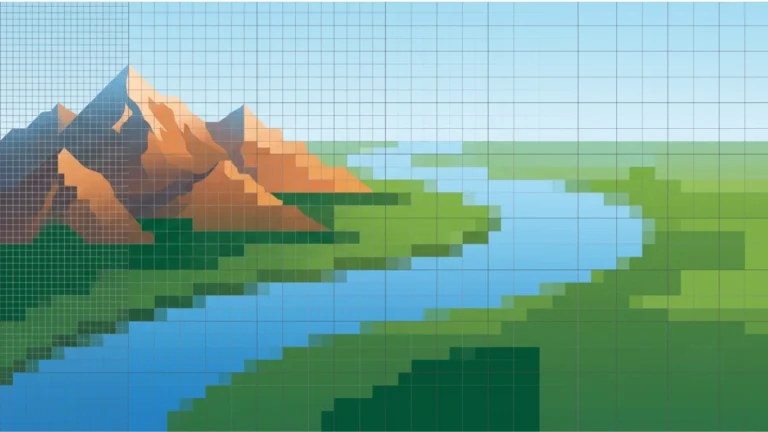
Raster images are the most common type of digital image. They are made of thousands or millions of tiny squares called pixels. Every pixel stores color information, and together they create photographs, screenshots, and realistic graphics.
Common Raster Formats
- PNG
- JPEG (JPG)
- BMP
- TIFF
- GIF
- WebP
- AVIF
- HEIC
Best Uses
- Photography
- Website graphics
- Digital painting
- Social media images
- Scanned documents
- Medical imaging
2. Vector Images
Vector images are created using mathematical paths, curves, and shapes instead of pixels. Because they are resolution-independent, they can be enlarged to any size without losing quality.
Common Vector Formats
- SVG
- AI
- EPS
- PDF (Vector)
- DXF
- CDR
Best Uses
- Company logos
- Icons
- Infographics
- CAD drawings
- Maps
- Brand identity
3. RAW Images
RAW images contain unprocessed data captured directly by a digital camera sensor. Unlike JPEG files, RAW images preserve maximum detail, making them ideal for professional editing.
| Popular RAW Formats | Camera Brand |
|---|---|
| CR2 / CR3 | Canon |
| NEF | Nikon |
| ARW | Sony |
| RAF | Fujifilm |
| DNG | Adobe Universal |
Best For: Professional photography, color correction, and image editing.
4. HDR Images
HDR (High Dynamic Range) images combine multiple exposures to capture both bright highlights and dark shadows in a single image. This produces more realistic lighting and greater detail.
Common HDR Formats
- HDR
- EXR
- Radiance HDR
Applications
- Photography
- Gaming
- Visual effects
- Architecture
- Product rendering
5. Animated Images
Animated images display multiple frames in sequence to create motion. They are widely used on websites, social media platforms, and messaging applications.
| Format | Supports Animation |
|---|---|
| GIF | Yes |
| APNG | Yes |
| Animated WebP | Yes |
| Animated AVIF | Yes |
6. 3D Images
3D images represent three-dimensional objects and environments. Unlike traditional images, they contain depth information and can be rotated, rendered, or animated.
Popular Formats
- OBJ
- FBX
- STL
- GLTF
- BLEND
Used In
- Video games
- Product visualization
- Architecture
- Animation
- Virtual Reality
7. Medical Images
Medical imaging helps healthcare professionals diagnose and monitor diseases. These specialized images are generated using medical equipment rather than digital cameras.
Examples
- X-rays
- MRI scans
- CT scans
- Ultrasound images
- PET scans
Primary Format: DICOM
8. Satellite Images
Satellite images capture Earth’s surface from space. They are essential in mapping, agriculture, weather forecasting, environmental monitoring, and disaster management.
Applications
- GIS
- Remote sensing
- Agriculture
- Urban planning
- Climate monitoring
Common Format: GeoTIFF
Most Popular Image File Formats
| Format | Image Type | Best For |
|---|---|---|
| PNG | Raster | Transparency & Graphics |
| JPEG | Raster | Photography |
| WebP | Raster | Fast Websites |
| AVIF | Raster | Modern Web Images |
| HEIC | Raster | Apple Devices |
| BMP | Raster | Bitmap Graphics |
| TIFF | Raster | Printing & Archiving |
| GIF | Raster | Animations |
| SVG | Vector | Logos & Icons |
| AI | Vector | Illustrations |
| EPS | Vector | Professional Printing |
| DXF | Vector | CAD & Engineering |
Advantages of Different Image Types
- Raster images produce realistic photographs.
- Vector images scale without losing quality.
- RAW files preserve maximum image detail.
- HDR images capture a wider dynamic range.
- Animated formats improve user engagement.
- 3D images provide realistic visualization.
- Medical images support accurate diagnosis.
- Satellite images enable large-scale geographic analysis.
Limitations of Different Image Types
- Raster images lose quality when enlarged.
- Vector graphics are not suitable for detailed photographs.
- RAW files require specialized editing software.
- HDR files can be larger than standard images.
- Animated images may increase page size.
- 3D files often require powerful hardware and software.
- Medical image formats are not supported by most standard image viewers.
- Satellite imagery datasets can require significant storage space.
Where Are Different Image Types Used?
| Industry | Common Image Types |
|---|---|
| Photography | RAW, JPEG, PNG |
| Web Development | WebP, AVIF, PNG, SVG |
| Graphic Design | PNG, SVG, AI |
| Printing | TIFF, EPS |
| Engineering | DXF, SVG |
| Healthcare | DICOM |
| GIS & Mapping | GeoTIFF |
| Gaming | PNG, FBX, OBJ |
| Architecture | OBJ, FBX, DXF |
| Education | JPEG, PNG, SVG |
There is no single “best” image type for every purpose. Use JPEG for photographs, PNG for transparent graphics, SVG for scalable logos and icons, WebP or AVIF for modern websites, TIFF for professional printing, and RAW for advanced photo editing.
Image Types Comparison
Choosing the right image type depends on your project. Some image types prioritize quality, while others focus on scalability, compression, transparency, or web performance.
Use JPEG for photographs, PNG for transparent graphics, SVG for scalable logos and icons, WebP or AVIF for modern websites, TIFF for professional printing, and RAW for professional photography.
Raster Images vs Vector Images
The biggest difference between raster and vector images is how they store visual information.
| Feature | Raster Images | Vector Images |
|---|---|---|
| Made Of | Pixels | Mathematical Paths |
| Scalability | Limited | Unlimited |
| Image Quality When Enlarged | May Become Pixelated | Remains Sharp |
| Best For | Photographs | Logos & Illustrations |
| Typical Formats | PNG, JPEG, TIFF, BMP, WebP | SVG, AI, EPS, DXF |
| File Size | Usually Larger | Usually Smaller |
PNG vs JPEG
| Feature | PNG | JPEG |
|---|---|---|
| Compression | Lossless | Lossy |
| Transparency | Yes | No |
| Best For | Graphics & Logos | Photographs |
| File Size | Larger | Smaller |
| Image Quality | Excellent | Very Good |
WebP vs AVIF
WebP and AVIF are modern image formats designed to reduce file sizes while maintaining high image quality.
| Feature | WebP | AVIF |
|---|---|---|
| Compression | Excellent | Excellent |
| Image Quality | High | Very High |
| Transparency | Yes | Yes |
| Animation | Yes | Yes |
| Browser Support | Very Good | Good |
| Best For | General Websites | Maximum Compression |
TIFF vs BMP
| Feature | TIFF | BMP |
|---|---|---|
| Compression | Optional | Usually None |
| Image Quality | Professional | Very High |
| Printing | Excellent | Good |
| File Size | Large | Very Large |
| Typical Use | Publishing | Windows Graphics |
Lossy vs Lossless Image Formats
| Lossy Formats | Lossless Formats |
|---|---|
| JPEG | PNG |
| WebP (Lossy) | WebP (Lossless) |
| AVIF (Lossy) | TIFF |
| HEIC | BMP |
Lossy compression reduces file size by permanently removing some image data, while lossless compression preserves all original image information.
How to Choose the Right Image Type
| If You Need… | Choose… |
|---|---|
| Professional Photos | RAW |
| Website Photos | JPEG or WebP |
| Transparent Images | PNG |
| Fast Website Loading | AVIF or WebP |
| Company Logo | SVG |
| Engineering Drawing | DXF |
| Professional Printing | TIFF |
| Medical Imaging | DICOM |
| Satellite Mapping | GeoTIFF |
Common Myths About Image Types
Myth 1: PNG Is Always Better Than JPEG
Fact: PNG is better for graphics with transparency, while JPEG is usually the better choice for photographs because of its smaller file size.
Myth 2: Vector Images Are Better Than Raster Images
Fact: Vector images are ideal for logos and illustrations, but photographs require raster formats.
Myth 3: Bigger Image Files Always Mean Better Quality
Fact: File size depends on image dimensions, compression method, color depth, and metadata—not only image quality.
Myth 4: WebP Replaces Every Other Image Format
Fact: WebP is excellent for websites, but formats like PNG, SVG, TIFF, and RAW are still better for specific use cases.
Myth 5: All Image Formats Support Transparency
Fact: Only certain formats, such as PNG, SVG, WebP, and AVIF, support transparent backgrounds.
Expert Tips
- Choose the image format based on the project rather than popularity.
- Use SVG whenever a logo or icon needs to scale perfectly.
- Compress images before uploading them to improve page speed.
- Use AVIF or WebP for modern websites whenever browser support meets your audience’s needs.
- Keep original RAW files for future editing.
- Save print-ready artwork in TIFF or other high-quality formats.
- Avoid enlarging low-resolution raster images because they can become pixelated.
- Use descriptive filenames and alt text to improve image SEO.
Frequently Asked Questions
What are the main types of images?
The main image types are raster images, vector images, RAW images, HDR images, animated images, 3D images, medical images, and satellite images.
Which image type is best for websites?
WebP and AVIF are excellent choices for modern websites because they provide high image quality with smaller file sizes. PNG and JPEG are also widely used depending on the content.
Which image type is best for logos?
SVG is generally the best format for logos because it is vector-based and can be resized without losing quality.
Which image type is best for photography?
RAW is preferred for editing, while JPEG is commonly used for sharing and publishing photographs.
Which image type supports transparency?
PNG, SVG, WebP, and AVIF support transparent backgrounds, making them suitable for logos, icons, and overlays.
Which image type is best for printing?
TIFF is commonly used for professional printing because it preserves high image quality and supports lossless storage.
Conclusion
Understanding the different types of images helps you choose the right format for every project. While no single image type is perfect for every situation, selecting the appropriate one can improve image quality, website performance, editing flexibility, and user experience.
Raster images are ideal for photographs and realistic graphics because they store information as pixels. Vector images are the best option for logos, icons, illustrations, and technical drawings since they can be scaled without losing quality. Other specialized image types, such as RAW, HDR, Medical (DICOM), and Satellite (GeoTIFF), serve professional industries that require advanced image data.
Modern formats like WebP and AVIF help websites load faster, while traditional formats such as PNG, JPEG, SVG, and TIFF continue to play essential roles in photography, graphic design, publishing, and web development.
Choose the image type based on your purpose:
- JPEG → Best for photographs
- PNG → Best for transparency and graphics
- SVG → Best for logos and icons
- WebP → Best for modern websites
- AVIF → Best for maximum compression
- TIFF → Best for professional printing
- RAW → Best for professional photography
- DXF → Best for engineering drawings

Quick Image Type Selection Guide
| Purpose | Recommended Image Type |
|---|---|
| Photography | JPEG, RAW |
| Transparent Graphics | PNG |
| Company Logo | SVG |
| Website Images | WebP, AVIF |
| Professional Printing | TIFF |
| Animations | GIF, Animated WebP |
| Engineering | DXF |
| Medical Imaging | DICOM |
| Satellite Mapping | GeoTIFF |
Image Types Summary Table
| Image Type | Main Advantage | Best Use |
|---|---|---|
| Raster | Realistic Detail | Photos |
| Vector | Infinite Scalability | Logos |
| RAW | Maximum Editing Flexibility | Professional Photography |
| HDR | Wide Dynamic Range | Landscape Photography |
| Animated | Motion | Web Graphics |
| 3D | Depth & Visualization | Gaming & CAD |
| Medical | Diagnostic Accuracy | Healthcare |
| Satellite | Geographic Analysis | GIS |
Related Articles
- What Is Raster Data?
- What Is Vector Data?
- Lossy vs Lossless
- PNG to SVG
- PNG to PDF
- HEIC to PNG
- AVIF to PNG
- TGA to PNG
- TIFF Meaning
- What Is HDR?
- What Is a DXF File?
- Google Images Guide
Helpful External Resources
- MDN Web Docs – Image File Types
- Google Developers – WebP
- AVIF Specification
- W3C SVG Documentation
- GDAL Documentation
Frequently Asked Questions
What are the main types of images?
The main types of images are raster images, vector images, RAW images, HDR images, animated images, 3D images, medical images, and satellite images.
What is the difference between raster and vector images?
Raster images are made of pixels and are best for photographs, while vector images use mathematical paths and can be resized without losing quality.
Which image format is best for websites?
WebP and AVIF are generally the best formats for websites because they provide excellent image quality with smaller file sizes.
Which image type supports transparency?
PNG, SVG, WebP, and AVIF support transparent backgrounds.
Which image format is best for printing?
TIFF is commonly preferred for professional printing because it preserves high image quality.
Which image type is best for logos?
SVG is the preferred format for logos because it scales to any size without losing quality.