
RGB vs CMYK: What’s the Difference? Complete Guide for Print & Digital (2026)
RGB vs CMYK: What Are the Key Differences and Benefits?
If you’ve ever designed a logo, edited a photo, created a website or prepared a brochure for printing, you’ve probably come across the terms RGB and CMYK. Both are colour models . They are used to produce images . They have different purposes and produce colours differently.
Choosing the wrong color mode can lead to unexpected results. An image that looks vibrant on your computer screen may appear dull when printed, while artwork designed for print may not display the same way on digital devices. Understanding the differences between RGB and CMYK helps ensure your colors look their best in every medium.
In this comprehensive guide, you’ll learn what RGB and CMYK are, how they work, their advantages and disadvantages, when to use each color model, and how to choose the right one for web design, photography, graphic design, and professional printing.
Quick Answer: RGB vs CMYK
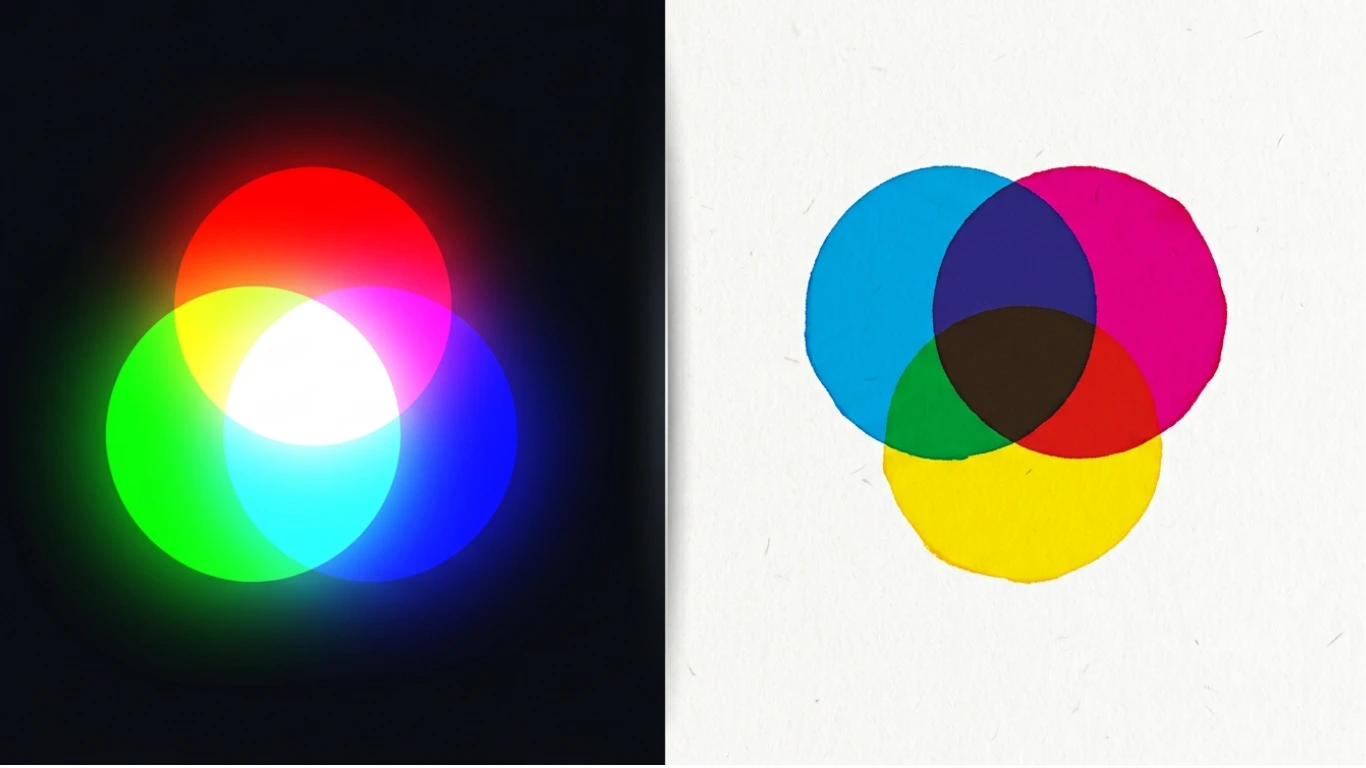
RGB (Red, Green, Blue) is an additive color model used by digital screens such as smartphones, computers, televisions, and tablets. It creates colors by combining light.
CMYK (Cyan, Magenta, Yellow, Black) is a subtractive color model used by printers. It creates colors by combining colored inks on paper.
In simple terms:
- RGB → Best for digital screens and websites.
- CMYK → Best for printing brochures, business cards, magazines, and packaging.
RGB vs CMYK at a Glance
| Feature | RGB | CMYK |
|---|---|---|
| Stands For | Red, Green, Blue | Cyan, Magenta, Yellow, Black |
| Color Method | Additive | Subtractive |
| Used For | Digital Displays | Printing |
| Primary Medium | Light | Ink |
| Color Range | Wider | Smaller |
| Best For | Websites, Apps, Photography | Books, Flyers, Packaging |
Table of Contents
- What Is RGB?
- What Is CMYK?
- How RGB Works
- How CMYK Works
- Additive vs Subtractive Color
- Advantages & Disadvantages
- Applications
- RGB vs CMYK Comparison
- Frequently Asked Questions
- Conclusion
What Is RGB?
RGB stands for Red, Green, and Blue. It is a color model that creates millions of colors by combining different intensities of red, green, and blue light.
RGB is known as an additive color model because colors become brighter as more light is added. When all three colors are combined at full intensity, they produce white light. When no light is present, the result is black.
Every digital display—including smartphones, laptops, desktop monitors, televisions, tablets, and projectors—uses RGB to display images, videos, and graphics.
RGB is also the standard color model for:
- Web design
- Mobile applications
- Social media graphics
- Digital photography
- Video production
- Computer games
- User interface design
- Digital advertising
RGB is a digital color model that mixes red, green, and blue light to create colors. It is used for anything displayed on electronic screens.
What Is CMYK?
CMYK stands for Cyan, Magenta, Yellow, and Black (Key). It is the standard color model used in commercial and home printing.
Unlike RGB, CMYK is a subtractive color model. Instead of producing colors with light, it creates colors by applying layers of ink to white paper. As more ink is added, more light is absorbed, resulting in darker colors.
The black ink, represented by the letter K, improves contrast, creates deeper shadows, and produces crisp text while reducing the amount of colored ink required.
CMYK is commonly used for:
- Business cards
- Brochures
- Books
- Magazines
- Posters
- Packaging
- Flyers
- Product labels
- Marketing materials
CMYK is a print color model that combines cyan, magenta, yellow, and black inks to reproduce colors on paper and other printed materials.
Why Do RGB and CMYK Both Exist?
Digital screens and printers create colors using completely different technologies. Screens emit light directly to your eyes, while printers place ink onto paper that reflects light. Because of this fundamental difference, a single color model cannot produce the best results for both digital displays and printed materials.
RGB is optimized for electronic displays, providing brighter and more vibrant colors. CMYK is optimized for ink-based printing, ensuring printed designs reproduce accurately on paper.
When Should You Use RGB?
- Designing websites
- Creating mobile apps
- Editing digital photographs
- Posting on social media
- Making YouTube thumbnails
- Creating presentations
- Designing online advertisements
- Producing videos

When Should You Use CMYK?
- Printing brochures
- Business cards
- Books and magazines
- Packaging design
- Product labels
- Posters
- Flyers
- Corporate stationery

How RGB Works
The RGB color model creates colors by combining three colored lights:
- Red (R)
- Green (G)
- Blue (B)
Each color channel typically ranges from 0 to 255. By changing the intensity of these three colors, millions of unique colors can be produced.
For example:
| RGB Value | Resulting Color |
|---|---|
| RGB(255,0,0) | Red |
| RGB(0,255,0) | Green |
| RGB(0,0,255) | Blue |
| RGB(255,255,255) | White |
| RGB(0,0,0) | Black |
| RGB(255,255,0) | Yellow |
Because RGB uses light, adding more color makes the image brighter. This is why it is called an additive color model.
How CMYK Works
The CMYK color model uses four ink colors to reproduce images on paper.
- Cyan (C)
- Magenta (M)
- Yellow (Y)
- Black (K)
Unlike RGB, CMYK does not emit light. Instead, the inks absorb certain wavelengths of light and reflect the remaining colors that we see.
Adding more ink generally creates darker colors, which is why CMYK is known as a subtractive color model.
| Ink Combination | Approximate Result |
|---|---|
| Cyan + Yellow | Green |
| Magenta + Yellow | Red |
| Cyan + Magenta | Blue |
| Cyan + Magenta + Yellow | Dark Brown |
| Black Ink (K) | Deep Black |
Additive vs Subtractive Color
The biggest difference between RGB and CMYK is the way they create colors.
| Feature | RGB | CMYK |
|---|---|---|
| Color Method | Additive | Subtractive |
| Uses | Light | Ink |
| Starts With | Black Screen | White Paper |
| Maximum Combination | White | Near Black |
| Primary Medium | Digital Displays | Printing |
- RGB adds light to create colors.
- CMYK adds ink to create colors.
Color Gamut: Why RGB Looks More Vibrant
A color gamut is the range of colors that a color model can reproduce.
RGB has a significantly wider color gamut than CMYK because digital displays can emit bright light directly. Printers, however, are limited by the physical properties of ink and paper.
This explains why some bright neon greens, vivid blues, and saturated oranges visible on a monitor cannot be reproduced exactly in print.
| Feature | RGB | CMYK |
|---|---|---|
| Color Range | Very Wide | More Limited |
| Brightness | Excellent | Moderate |
| Neon Colors | Supported | Limited |
| Screen Accuracy | Excellent | Not Intended |
| Print Accuracy | Poor | Excellent |
Advantages of RGB
- Produces bright and vibrant colors.
- Offers a wider color gamut than CMYK.
- Ideal for websites and mobile apps.
- Works perfectly with digital cameras.
- Supported by all modern displays.
- Excellent for video editing and animation.
- Preferred for online advertising.
Advantages of CMYK
- Industry standard for commercial printing.
- Produces predictable printed colors.
- Optimized for brochures, books, and packaging.
- Provides crisp black text using dedicated black ink.
- Compatible with professional printing presses.
- Reduces printing costs through efficient ink usage.
Disadvantages of RGB
- Not suitable for professional printing.
- Colors may shift after conversion to CMYK.
- Some vibrant colors cannot be printed accurately.
- Depends on monitor calibration.
Disadvantages of CMYK
- Smaller color gamut than RGB.
- Less vibrant on digital screens.
- Not ideal for websites or mobile applications.
- Converting back to RGB may not restore the original appearance.
Common Applications
| Application | Recommended Color Model |
|---|---|
| Website Design | RGB |
| Mobile Apps | RGB |
| Social Media Graphics | RGB |
| Digital Photography | RGB |
| YouTube Thumbnails | RGB |
| Business Cards | CMYK |
| Books | CMYK |
| Magazines | CMYK |
| Packaging Design | CMYK |
| Product Labels | CMYK |
Can You Convert RGB to CMYK?
Yes. Most professional design software allows you to convert RGB images to CMYK before printing. However, because CMYK has a smaller color gamut, some bright RGB colors may appear less vibrant after conversion.
For the most accurate printed results, designers often create print projects directly in CMYK rather than converting them at the final stage.
Can You Convert CMYK to RGB?
Yes. CMYK files can also be converted to RGB for digital use. While the conversion is straightforward, the appearance may change because RGB displays a wider range of colors than CMYK printing can reproduce.
If your final design will only appear on screens, create it in RGB. If it will be professionally printed, begin the project in CMYK to reduce unexpected color shifts and minimize revisions.
RGB vs CMYK: Side-by-Side Comparison
Although RGB and CMYK are both used to reproduce colors, they were designed for different technologies. RGB is intended for electronic displays that emit light, while CMYK is designed for printers that apply ink to paper.
| Feature | RGB | CMYK |
|---|---|---|
| Full Form | Red, Green, Blue | Cyan, Magenta, Yellow, Black |
| Color Method | Additive | Subtractive |
| Medium | Light | Ink |
| Primary Use | Digital Displays | Printing |
| Color Gamut | Wider | Smaller |
| Brightness | Very Bright | Moderate |
| Best For | Websites, Apps, Videos | Books, Flyers, Packaging |
| Used By | Monitors, TVs, Smartphones | Printers & Printing Presses |
RGB vs CMYK for Printing
Professional printers use CMYK because printing relies on colored inks rather than light. If an RGB design is sent directly to a printer, the printing software will usually convert it to CMYK automatically.
This automatic conversion can cause noticeable differences in color because RGB contains many bright colors that CMYK cannot reproduce accurately.
| Printing Task | Recommended Color Model |
|---|---|
| Business Cards | CMYK |
| Flyers | CMYK |
| Books | CMYK |
| Packaging | CMYK |
| Magazines | CMYK |
| Posters | CMYK |
RGB vs CMYK for Websites
All modern digital displays use RGB. Whether visitors access your website from a phone, tablet, laptop, television, or desktop computer, images are displayed using red, green, and blue light.
Saving website graphics in RGB helps preserve vibrant colors while ensuring compatibility with browsers and digital devices.
| Digital Project | Recommended Color Model |
|---|---|
| Website Images | RGB |
| Blog Graphics | RGB |
| YouTube Thumbnails | RGB |
| Social Media Posts | RGB |
| Online Advertisements | RGB |
| Mobile Apps | RGB |
RGB vs HEX
RGB and HEX are closely related, but they are not the same thing.
RGB represents colors using three numeric values for red, green, and blue. HEX is simply another way to represent the same RGB colors using hexadecimal numbers.
| Feature | RGB | HEX |
|---|---|---|
| Example | RGB(255,0,0) | #FF0000 |
| Purpose | Color Values | Web Color Code |
| Used In | Graphics Software | HTML & CSS |
| Based On | Red, Green, Blue | RGB Values |
Common Color Conversion Mistakes
1. Designing Print Projects in RGB
Many beginners create brochures, posters, and business cards in RGB. This often causes printed colors to appear less vibrant than expected.
Monitors emit light, while paper reflects light. Because of this difference, identical colors are rarely possible.
3. Ignoring Printer Color Profiles
Professional print shops often provide ICC color profiles to improve color accuracy. Ignoring these profiles may result in unexpected color shifts.
4. Converting Files at the Last Minute
Converting a completed RGB design to CMYK just before printing may alter colors. It’s generally better to begin print projects in CMYK.
Common Myths About RGB and CMYK
Myth 1: RGB Is Better Than CMYK
Reality: RGB is better for digital screens, while CMYK is better for printing. Neither color model is universally superior.
Myth 2: CMYK Produces More Colors
Reality: RGB has a wider color gamut and can display more vibrant colors than CMYK.
Myth 3: RGB Files Cannot Be Printed
Reality: RGB files can be printed, but they are usually converted to CMYK during the printing process.
Myth 4: Black in RGB Is the Same as Black in CMYK
Reality: RGB black is created by turning off light, while CMYK black is produced using black ink and sometimes a combination of colored inks.
Myth 5: All Printers Use Only CMYK
Reality: Many professional printers also use additional inks such as light cyan, light magenta, orange, green, or specialty spot colors to improve color reproduction.
Expert Tips
- Create websites, apps, and social media graphics in RGB.
- Design brochures, business cards, and packaging in CMYK.
- Ask your printing company for their preferred color profile before starting large print projects.
- Always proof important printed designs before mass production.
- Export website images as RGB PNG, JPEG, WebP, or AVIF.
- Keep an RGB master file when creating artwork for both digital and print use.
- Calibrate your monitor if color accuracy is important.
- Avoid repeated RGB-to-CMYK and CMYK-to-RGB conversions to reduce unnecessary color changes.
Frequently Asked Questions
Which is better, RGB or CMYK?
Neither is universally better. RGB is best for digital displays, while CMYK is the standard for professional printing.
Why does my printed design look different from my screen?
Computer screens use RGB light, while printers use CMYK ink. Since the two color models have different color gamuts, some colors cannot be reproduced exactly.
Should I convert RGB to CMYK before printing?
Yes. Converting to CMYK before sending files to a printer helps you preview how colors will appear in print and reduces unexpected color shifts.
Can CMYK be used for websites?
No. Browsers and digital displays use RGB, so images intended for websites should remain in RGB.
Why does CMYK use K instead of B?
The letter K stands for Key, which refers to the black key plate used during the printing process. Using K also avoids confusion with the Blue channel in RGB.
Which software supports RGB and CMYK?
Most professional design applications, including Adobe Photoshop, Adobe Illustrator, Adobe InDesign, Affinity Designer, Affinity Photo, CorelDRAW, and many other graphics programs, support both RGB and CMYK color modes.
Conclusion
Understanding the difference between RGB and CMYK is essential for anyone working with digital graphics, photography, web design, or professional printing. Although both color models are used to reproduce colors, they are designed for completely different purposes.
RGB creates colors by combining red, green, and blue light, making it the ideal choice for websites, mobile applications, videos, digital photography, and electronic displays. It offers a wider color gamut and produces bright, vibrant colors that look excellent on screens.
CMYK, on the other hand, creates colors by combining cyan, magenta, yellow, and black inks. It is specifically designed for commercial printing and provides more predictable results on paper for brochures, business cards, magazines, packaging, and other printed materials.
Choosing the correct color model at the beginning of your project helps maintain color accuracy, reduces editing time, and prevents unexpected color shifts when moving between digital and printed media.
- Choose RGB for websites, apps, digital artwork, photography, videos, presentations, and social media.
- Choose CMYK for brochures, flyers, business cards, books, posters, magazines, packaging, and other printed products.
RGB or CMYK: Which Should You Choose?
| If Your Project Is… | Recommended Color Model |
|---|---|
| Website | RGB |
| Blog Images | RGB |
| Social Media Graphics | RGB |
| YouTube Thumbnail | RGB |
| Mobile App | RGB |
| Digital Photography | RGB |
| Business Card | CMYK |
| Brochure | CMYK |
| Magazine | CMYK |
| Book | CMYK |
| Packaging Design | CMYK |
| Poster | CMYK |
RGB vs CMYK Summary
| Feature | RGB | CMYK |
|---|---|---|
| Best For | Digital Media | Printing |
| Uses | Light | Ink |
| Primary Colors | Red, Green, Blue | Cyan, Magenta, Yellow, Black |
| Color Range | Wider | More Limited |
| Typical Output | Screens | Paper |
| Main Strength | Bright Digital Colors | Accurate Printed Colors |
Related Articles
- Types of Images
- Lossy vs Lossless
- What Is Raster Data?
- What Is Vector Data?
- What Is HDR?
- TIFF Meaning
- HEIC to PNG
- AVIF to PNG
- PNG to PDF
- What Is a DXF File?
Helpful External Resources
- MDN Web Docs – RGB Color Values
- Adobe – RGB vs CMYK
- W3C CSS Color Module Level 4
- International Color Consortium (ICC)
Frequently Asked Questions
What is the main difference between RGB and CMYK?
The main difference is that RGB is a color model for digital displays that creates colors using red, green, and blue light, while CMYK is a printing color model that creates colors using cyan, magenta, yellow, and black inks.
Is RGB better than CMYK?
Neither color model is universally better. RGB is ideal for digital screens because it offers a wider color gamut and brighter colors, whereas CMYK is the standard for professional printing.
When should I use RGB?
Use RGB when creating websites, mobile apps, digital artwork, presentations, videos, social media graphics, or any content that will be viewed on electronic screens.
When should I use CMYK?
Use CMYK for brochures, business cards, flyers, magazines, books, posters, product packaging, and any design intended for professional printing.
Can I print an RGB image?
Yes. Most printers automatically convert RGB files to CMYK before printing. However, some colors may appear less vibrant because CMYK has a smaller color gamut.
Why do printed colors look different from screen colors?
Computer screens produce colors using light (RGB), while printers reproduce colors with ink (CMYK). Since these technologies work differently, printed colors may not exactly match what you see on your monitor.
Why does CMYK use black (K) instead of B?
The letter K stands for Key, referring to the key printing plate that adds detail, contrast, and sharp black text. It also avoids confusion with the blue channel in RGB.
Can I convert RGB to CMYK?
Yes. Most graphic design software, including Adobe Photoshop, Illustrator, and InDesign, can convert RGB files to CMYK. Keep in mind that some bright RGB colors may change during the conversion.
Can I convert CMYK to RGB?
Yes. CMYK files can be converted to RGB for digital use. After conversion, some colors may appear brighter because RGB supports a wider range of colors.
Does RGB have more colors than CMYK?
Yes. RGB has a larger color gamut, allowing it to display more vibrant colors, especially bright blues, greens, and neon shades that are difficult to reproduce with CMYK printing.
Which color mode should I use for a logo?
If your logo will only be used online, RGB is the best choice. If it will also be printed on business cards, packaging, or promotional materials, create both RGB and CMYK versions for the best results.
Should I start my print design in RGB or CMYK?
If the final product will be professionally printed, it’s best to start the design in CMYK. This helps prevent unexpected color shifts and provides a more accurate preview of the printed result.
Which software supports RGB and CMYK?
Professional design applications such as Adobe Photoshop, Adobe Illustrator, Adobe InDesign, CorelDRAW, Affinity Designer, and Affinity Photo support both RGB and CMYK color modes.
Does PNG use RGB or CMYK?
PNG files are primarily designed for RGB color and are commonly used for websites, digital graphics, and images with transparent backgrounds. CMYK PNG files are uncommon and not widely supported.
Which color mode is best for websites?
RGB is the best color mode for websites because all modern monitors, smartphones, tablets, and browsers display colors using the RGB color model.